Azure DevOps Pipeline Runtime parameter Task Condition
This guide explains you how to use Azure DevOps pipeline to pass runtime boolean values and run tasks only if condition is true else skip the task.
- Add following lines at the beginning of your pipeline YAML file
parameters:
- name: installNewRelic
type: boolean
default: false
trigger:
branches:
include:
- qa
paths:
include:
- '*'
exclude:
- 'docs/*'
- '*.md'
pr:
branches:
include:
- qa
variables:
drupalroot: '/usr/share/nginx/html'
docroot: '/usr/share/nginx/html/docroot'
newrelic_cmd: 'docker run --entrypoint /bin/mv $(containerRegistry)/$(imageRepository):latest'
stages:
- stage: ReleaseToQA
condition: and(succeeded(), eq(variables['Build.SourceBranch'], 'refs/heads/qa'))
displayName: Release to QA
jobs:
- job: Release
displayName: Release
- deployment: DeployToQA
environment: $(webAppNameQA)
strategy:
runOnce:
deploy:
steps:
...
Other Tasks
...
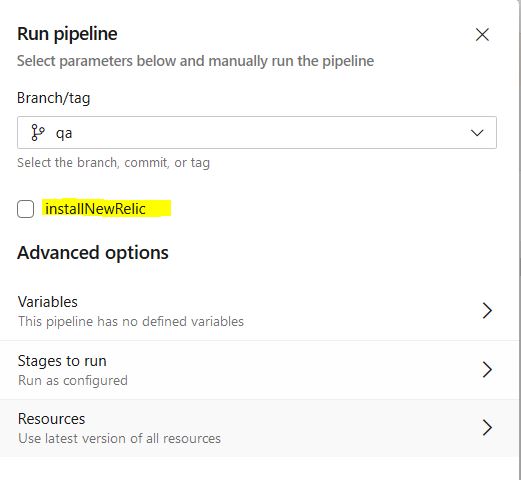
# Below Task will only be executed if condition is true, default value is
# false in parameter. When you click on run pipeline it will ask you the
# parameter value i.e. installNewRelic if you select then condition becomes
# true and below task will executed else it will be skipped.
# Refer the screenshot below
- task: Bash@3
displayName: 'Place newrelic.ini from /usr/share/nginx/html/docroot/profiles/'
condition: and(succeeded(), eq('${{ parameters.installNewRelic }}', true))
inputs:
targetType: 'inline'
script: |
$(newrelic_cmd) $(docroot)/profiles/corp-qa-newrelic.ini /etc/php/7.3/mods-available/newrelic.ini